Many ecommerce businesses assume Google Ads alone is enough to run Shopping Ads.
They create a Google Ads account, launch a campaign, and expect products to appear on Google Shopping automatically. Then nothing happens.
Products do not show.
Campaigns stay limited.
Merchant Center errors appear.
Performance Max struggles to scale.
This confusion is extremely common among Shopify, WooCommerce, and Magento store owners.
The reason is simple.
Google Ads manages advertising campaigns, but Google Merchant Center manages the actual product data Google needs to understand what you sell.
Without product data, Google cannot create Shopping Ads properly.
Here is the direct answer most beginners are looking for:
Yes, you need Google Merchant Center to run standard Google Shopping Ads because Google uses Merchant Center to store and manage your product feed data.
No Merchant Center means Google cannot understand your products, prices, availability, images, or shipping information.
That is why even experienced ecommerce businesses spend time optimizing their Google Shopping feed instead of focusing only on ad budgets.
In this article, you will learn:
- What Google Merchant Center actually does
- Why Shopping Ads depend on Merchant Center
- The difference between Google Ads and GMC
- How free listings work
- Why poor feed quality hurts ROAS
- When professional setup and optimization matter
If your products are getting disapproved, Shopping Ads are underperforming, or Merchant Center setup feels confusing, professional Google Merchant Center management can help prevent expensive mistakes before they affect revenue.
What Is Google Merchant Center?
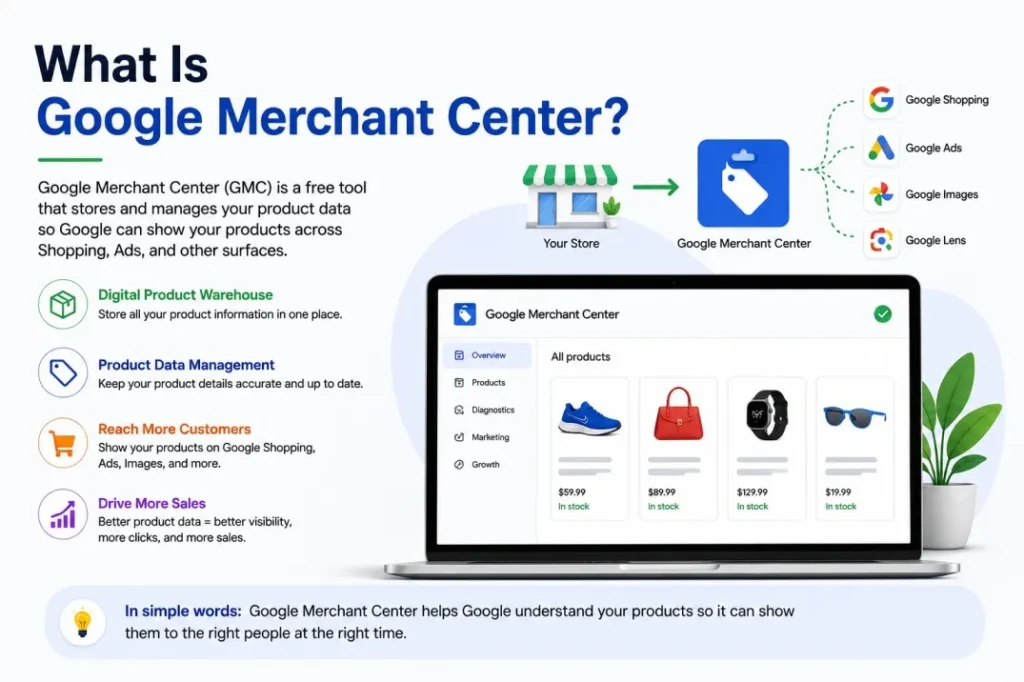
Beginner-Friendly Explanation of GMC
Google Merchant Center is basically a digital product warehouse for Google.
It stores all the information about the products you want Google to display across:
- Google Shopping
- Shopping Ads
- Free product listings
- Performance Max campaigns
- Google Images product results
Think of Merchant Center as the bridge between your ecommerce store and Google’s shopping ecosystem.
Your store contains products.
Merchant Center organizes those products for Google.
Google Ads promotes those products through campaigns.
Without Merchant Center, Google has no structured product data to work with.
That is why Google Shopping Ads are called feed-based ads.
Google does not create Shopping Ads from keywords alone.
It creates them using product feed data.
What Merchant Center Actually Stores
Merchant Center stores important ecommerce information such as:
- Product titles
- Product descriptions
- Prices
- Availability status
- GTINs and MPNs
- Product categories
- Product images
- Shipping information
- Tax settings
- Brand details
- Product variants
For example, if you sell shoes through Shopify, Merchant Center helps Google understand:
- The shoe brand
- Color
- Size
- Price
- Availability
- Product condition
- Product image
Google then uses this information to decide when your products should appear in Shopping results.
This is why feed optimization directly impacts Shopping visibility.
Better data helps Google match products to relevant searches more accurately.
Why Ecommerce Stores Need GMC
Most ecommerce platforms integrate directly with Merchant Center, including:
- Shopify
- WooCommerce
- Magento
These platforms can automatically sync product data into Merchant Center through apps, plugins, or feed tools.
For example:
- Shopify stores often use the Google & YouTube app
- WooCommerce stores commonly use product feed plugins
- Magento stores may use advanced XML feed integrations
But syncing products is only the beginning.
Many ecommerce businesses think:
“Products uploaded successfully means everything is optimized.”
That is rarely true.
Poor product titles, missing GTINs, incorrect categories, or policy violations can reduce visibility or trigger disapprovals.
This is why understanding Merchant Center matters even if your platform automates the setup.
If you are completely new to ecommerce feeds, read our guide on what Google Merchant Center is and how it works.
Do You Need Google Merchant Center for Google Shopping Ads?
The Short Answer
Yes.
You need Google Merchant Center for standard Google Shopping Ads.
Google Shopping campaigns cannot function properly without a Merchant Center account because Shopping Ads rely on product feed data.
This is the biggest difference between traditional Search Ads and Shopping Ads.
Search Ads use keywords and text ads.
Shopping Ads use product feed information.
Without Merchant Center, there is no approved product feed for Google to display.
Why Google Requires Merchant Center
Google requires Merchant Center because Shopping Ads are feed-based advertising campaigns.
When someone searches for:
- “Nike running shoes”
- “wireless gaming mouse”
- “wooden dining table”
Google pulls product information directly from Merchant Center feeds.
That includes:
- Product title
- Product image
- Price
- Store name
- Availability
- Promotions
Google Ads alone cannot provide this information.
Merchant Center acts as the structured product database powering Shopping Ads.
This is also why inaccurate product feeds waste ad spend.
If your feed contains weak titles or incorrect attributes, Google may show products for irrelevant searches or fail to match them correctly.
That leads to:
- Lower CTR
- Poor conversion rates
- Higher CPCs
- Reduced ROAS
Many ecommerce businesses focus only on bidding strategies while ignoring feed quality.
That is one of the most common Shopping Ads mistakes.
How Google Shopping Ads Actually Work
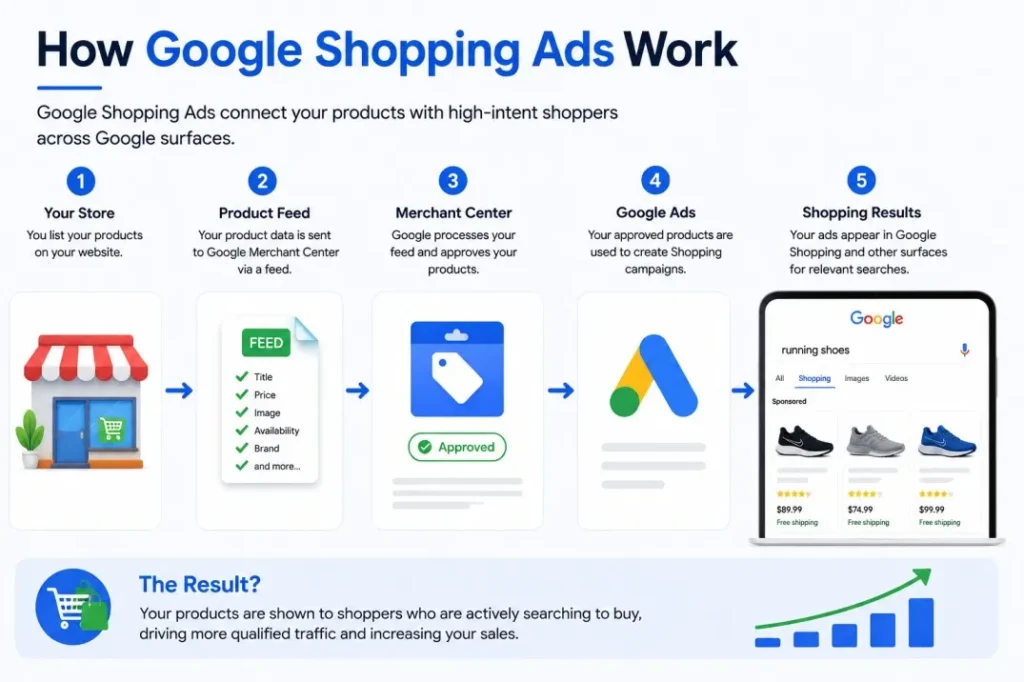
Here is the basic process behind Shopping Ads:
1. Upload Products to Merchant Center
Your ecommerce store sends product data into GMC through:
- API integrations
- XML feeds
- Google apps
- Feed management tools
2. Sync Merchant Center With Google Ads
Merchant Center connects with your Google Ads account.
This allows Google Ads campaigns to access approved products.
3. Google Uses Feed Data
Google analyzes your product information to understand:
- What you sell
- Which searches are relevant
- Which users may convert
This is where feed optimization becomes critical.
Google heavily depends on titles, categories, GTINs, and attributes.
4. Products Enter Shopping Auctions
When users search for products, Google decides which products appear based on:
- Feed quality
- Bid strategy
- Relevance
- Product data accuracy
- Historical performance
Suggested visual flowchart for this section:
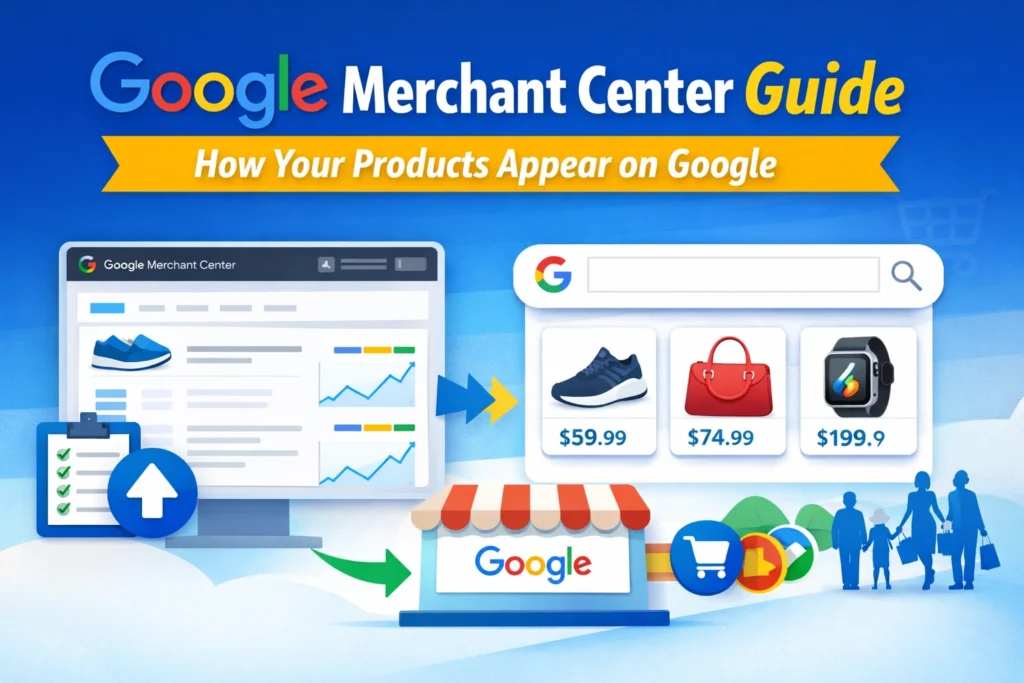
Store → Product Feed → Merchant Center → Google Ads → Shopping Results
Can You Run Google Shopping Ads Without Merchant Center?
Why the Answer Is Usually No
For standard Shopping campaigns, the answer is no.
Merchant Center is required because Google needs a verified product feed to display Shopping Ads.
Without Merchant Center:
- Products cannot be approved
- Feed data cannot sync
- Shopping campaigns cannot access inventory
- Google cannot display product listings properly
This applies whether you use:
- Shopify
- WooCommerce
- Magento
- BigCommerce
- Custom ecommerce stores
No Merchant Center means no structured product inventory for Google Shopping.
Exception: Performance Max Still Uses GMC
This is where many beginners get confused.
Some businesses think Performance Max eliminates the need for Merchant Center.
That is incorrect for ecommerce campaigns.
Performance Max still relies heavily on Merchant Center product feeds when promoting ecommerce products.
Even though Performance Max automates placements across:
- Search
- Shopping
- YouTube
- Gmail
- Display
- Discover
…the ecommerce product data still comes from Merchant Center.
That means:
- Product feed quality still matters
- Product titles still affect visibility
- GTINs still matter
- Product categorization still impacts performance
Performance Max does not replace Merchant Center.
It uses Merchant Center as its ecommerce product source.
Can You Run Google Shopping Ads Without Merchant Center?
Common Beginner Confusion Around Google Ads vs GMC
A lot of ecommerce businesses think Google Ads and Google Merchant Center are the same platform.
They are connected, but they serve completely different purposes.
Here is the simplest way to understand it:
| Feature | Google Ads | Google Merchant Center |
|---|---|---|
| Main Purpose | Runs advertising campaigns | Stores and manages product data |
| Handles Bidding | Yes | No |
| Stores Product Feed | No | Yes |
| Controls Budgets | Yes | No |
| Product Approvals | No | Yes |
| Feed Optimization | Limited | Yes |
| Shopping Campaign Access | Yes | Provides products for campaigns |
| Ecommerce Data Management | No | Yes |
Think of it this way:
- Google Ads controls promotion
- Merchant Center controls product information
Both are required for effective Shopping Ads.
This is why many ecommerce campaigns fail even when ad budgets are high.
Businesses focus on bidding strategies while ignoring feed quality inside Merchant Center.
Still confused about the difference? Read our full comparison of Google Merchant Center vs Google Ads.
Why Google Merchant Center Is Important for Shopping Ads
Product Feed Quality Affects Performance
Your Shopping feed directly affects how often products appear and how well they perform.
Google uses product data to determine:
- Relevance
- Search matching
- Product visibility
- Auction eligibility
This means better feeds usually produce:
- Better search visibility
- Higher click-through rates
- Better conversion quality
- Improved ROAS
For example, compare these two product titles:
Bad title:
Men Shoes Black
Optimized title:
Nike Air Zoom Pegasus Men’s Running Shoes Black Size 10
The second title gives Google significantly more context.
That improves search matching for relevant buying searches.
Better titles often increase qualified traffic without increasing ad spend.
This is one reason experienced ecommerce advertisers spend time optimizing product feeds instead of relying only on automated bidding.
GMC Helps Google Understand Your Products
Merchant Center helps Google interpret product information properly.
Google analyzes:
- Product attributes
- Categories
- GTINs
- Brands
- Sizes
- Colors
- Pricing
- Variants
If data is incomplete or inaccurate, Google struggles to understand product relevance.
This can lead to:
- Poor search matching
- Irrelevant traffic
- Reduced Shopping visibility
- Lower conversion rates
No Merchant Center means Google cannot understand your products correctly.
That is why product feed optimization is one of the most important parts of Google Shopping strategy.
GMC Controls Product Approvals & Disapprovals
Merchant Center is also responsible for product approval status.
Many ecommerce businesses discover this only after products stop showing.
Common product disapproval issues include:
- Missing GTINs
- Price mismatches
- Broken landing pages
- Policy violations
- Poor image quality
- Unsupported claims
- Incorrect availability status
For example:
If your Shopify store says a product costs ₹2,999 but the feed says ₹2,499, Google may disapprove the product due to price mismatch errors.
Another common issue involves image problems.
Google may reject products if:
- Images contain promotional text
- Watermarks appear
- Product images are too small
- Images do not clearly show the product
Feed issues like these directly affect Shopping campaign performance.
Many ecommerce businesses lose revenue due to poor feed quality and unresolved Merchant Center errors.
GMC Enables Free Listings Too
Merchant Center is not only for paid Shopping Ads.
It also powers free product listings across Google surfaces.
That means products can appear organically on:
- Google Shopping tab
- Google Search
- Google Images
- Google Lens
- Other Google shopping experiences
This gives ecommerce businesses additional visibility without direct ad costs.
Free listings have become especially valuable for smaller ecommerce stores trying to build traffic before scaling paid campaigns.
Free Listings vs Paid Shopping Ads
What Are Free Listings?
Free listings allow products to appear organically on Google without paying per click.
Google pulls this information directly from Merchant Center product feeds.
These listings can appear in:
- Shopping tab results
- Product search experiences
- Google Images
- Local product displays
Free listings do not require ad spend, but they still require Merchant Center.
That is important to understand.
Even unpaid product visibility depends on structured product feed data.
What Are Paid Shopping Ads?
Paid Shopping Ads are sponsored product placements managed through Google Ads.
Businesses bid to appear for ecommerce-related searches.
These ads typically display:
- Product image
- Product title
- Price
- Store name
- Ratings
- Promotions
Shopping Ads usually appear near the top of search results and often generate high purchase intent traffic.
But again, the products themselves still come from Merchant Center.
Google Ads manages promotion.
Merchant Center provides the product inventory.
Key Differences Between Free Listings and Shopping Ads
| Feature | Free Listings | Paid Shopping Ads |
|---|---|---|
| Cost | Free | Pay per click |
| Placement Priority | Lower | Higher |
| Speed of Visibility | Slower | Faster |
| Traffic Scale | Limited | Scalable |
| Bidding Control | None | Full control |
| Performance Data | Limited | Advanced reporting |
| Product Feed Required | Yes | Yes |
Many beginners incorrectly assume free listings eliminate the need for Merchant Center.
Actually, Merchant Center powers both systems.
Why Businesses Should Use Both Together
The strongest ecommerce strategy usually combines:
- Free listings
- Paid Shopping Ads
- Performance Max campaigns
This creates multiple visibility opportunities across Google.
Free listings help build additional exposure without extra click costs.
Shopping Ads help scale high-intent traffic faster.
Together, they strengthen ecommerce visibility across the full customer journey.
This is one reason many ecommerce businesses invest heavily in Merchant Center optimization.
A properly optimized feed can improve both paid and organic product visibility at the same time.
Supporting topics like “Benefits of Google Merchant Center for Ecommerce” fit naturally here because Merchant Center affects much more than paid ads alone.
What Happens If Your Merchant Center Is Poorly Configured?
Product Disapprovals
Poor Merchant Center setup often leads to product disapprovals.
This is one of the biggest frustrations for ecommerce store owners.
Products may disappear because of:
- Missing identifiers
- Invalid pricing
- Feed mismatches
- Policy violations
- Image issues
- Incorrect shipping data
Sometimes businesses do not even realize products are disapproved until traffic suddenly drops.
That is why regular Merchant Center monitoring matters.
Shopping Ads Not Showing
Many businesses launch Shopping campaigns but never see impressions.
Usually the issue is not bidding.
It is feed quality or Merchant Center configuration.
Common causes include:
- Pending product approvals
- Feed processing errors
- Account suspensions
- Missing shipping settings
- Incomplete attributes
- Low product relevance
If Merchant Center is not configured correctly, Google cannot confidently display products.
Suspended Merchant Center Accounts
Merchant Center suspensions are more serious than individual product disapprovals.
A suspension can stop all Shopping visibility completely.
Common suspension triggers include:
- Misrepresentation issues
- Inconsistent business information
- Unsupported claims
- Policy violations
- Untrustworthy checkout experiences
Recovering suspended accounts can be difficult without understanding Google’s ecommerce policies properly.
Many businesses repeatedly submit fixes without addressing the root issue.
Low Shopping Ad Performance
Sometimes products are approved but still perform poorly.
This is where feed optimization becomes critical.
Weak product feeds often cause:
- Low CTR
- High CPCs
- Poor search relevance
- Weak conversion rates
- Reduced ROAS
For example:
If product titles are too generic, Google may match products to low-intent searches.
That wastes budget on unqualified clicks.
Optimized product data improves search accuracy and campaign efficiency.
Feed Quality Problems That Hurt ROAS
Poor feed quality quietly damages Shopping campaign performance.
Many ecommerce businesses increase budgets without realizing their product feed is the real problem.
Here are common feed issues that reduce ROAS:
| Feed Problem | Performance Impact |
|---|---|
| Weak product titles | Lower visibility |
| Missing GTINs | Reduced matching accuracy |
| Incorrect categories | Irrelevant traffic |
| Low-quality images | Lower CTR |
| Price mismatches | Product disapprovals |
| Missing attributes | Poor targeting |
| Inaccurate availability | Wasted clicks |
For example:
A product titled:
Bluetooth Speaker
…is far less effective than:
JBL Waterproof Bluetooth Speaker Portable Outdoor Wireless Speaker
The second title gives Google far more search relevance signals.
That improves:
- Search matching
- Buyer intent alignment
- Click quality
- Conversion potential
Feed optimization impacts conversions much more than most beginners realize.
How to Properly Set Up Google Merchant Center for Shopping Ads
Create Merchant Center Account
Start by creating a Merchant Center account through Google Mechant Center.
Google will ask for:
- Business name
- Website URL
- Country
- Contact details
Use accurate business information from the beginning.
Inconsistent business data can later create verification or trust issues.
Verify & Claim Website
Next, verify your ecommerce website.
Google needs confirmation that you own the store connected to the product feed.
Verification methods usually include:
- HTML tag
- Google Tag Manager
- Google Analytics
- DNS verification
After verification, claim the website inside Merchant Center.
Without claiming the website, products cannot fully activate for Shopping experiences.
Upload Product Feed
Now upload your product feed.
This is the core of Merchant Center.
Common feed methods include:
| Feed Method | Best For |
|---|---|
| API integration | Large ecommerce stores |
| Google app integrations | Shopify beginners |
| XML feed | Advanced stores |
| Google Sheets | Small catalogs |
| Scheduled fetch | Automated syncing |
Most Shopify and WooCommerce stores use automated feed syncing.
But automation alone does not equal optimization.
Always review:
- Product titles
- Descriptions
- Categories
- GTINs
- Image quality
- Variants
- Availability
Poor feed structure creates long-term Shopping problems.
Configure Shipping & Tax
Shipping configuration is one of the most overlooked Merchant Center settings.
Incorrect shipping setup often causes:
- Product disapprovals
- Price mismatch warnings
- Poor user experience
Google expects shipping information to match your website accurately.
Depending on your country, you may also need tax settings configured properly.
Always verify:
- Shipping rates
- Delivery regions
- Delivery times
- Return information
This improves both compliance and conversion trust.
Link Merchant Center With Google Ads
After feed setup, connect Merchant Center with your Google Ads account.
This connection allows Shopping campaigns and Performance Max campaigns to access approved products.
Without account linking:
- Products cannot serve in Shopping campaigns
- Ecommerce Performance Max campaigns cannot function properly
This step is simple technically, but essential operationally.
Submit Products for Approval
Once products are uploaded, Google reviews them for policy compliance.
Approval timelines vary, but products typically process within a few days.
Google checks for:
- Accurate pricing
- Valid landing pages
- Product policy compliance
- Proper image quality
- Correct availability
This is where many beginner setups fail.
Even small policy violations can limit visibility significantly.
Optimize Product Feed
Most ecommerce businesses stop after uploading products.
Experienced Shopping advertisers start optimizing after upload.
Feed optimization includes:
- Improving titles
- Adding missing attributes
- Enhancing descriptions
- Optimizing categories
- Fixing GTIN issues
- Improving images
- Refining variant structure
This directly affects Shopping visibility and ROAS.
If you want a full walkthrough, follow our step-by-step Google Merchant Center setup guide.
Why Product Feed Optimization Matters More Than Most Businesses Realize
Product Titles Influence Search Visibility
Product titles are one of the strongest ranking signals inside Shopping Ads.
Google relies heavily on titles to determine:
- Search relevance
- Product intent
- Matching accuracy
Weak titles reduce visibility even if products are approved.
Strong titles usually include:
- Brand
- Product type
- Key attributes
- Model details
- Important variations
Example:
Weak title:
Office Chair
Optimized title:
Ergonomic Mesh Office Chair Adjustable Lumbar Support Black
The optimized title improves matching accuracy significantly.
That often increases qualified traffic without increasing bids.
Feed Attributes Affect Matching Accuracy
Google Shopping is heavily attribute-driven.
Attributes help Google understand products at a granular level.
Important attributes include:
- GTIN
- Brand
- Color
- Size
- Material
- Gender
- Age group
- Product category
Missing attributes reduce Google’s confidence in product relevance.
This often lowers Shopping visibility.
Many ecommerce stores unknowingly lose impressions because feeds are incomplete.
Optimized Feeds Improve ROAS
Better feeds improve campaign efficiency.
Why?
Because Google sends more qualified traffic when product data is clearer.
Optimized feeds usually improve:
- CTR
- Conversion rates
- Search relevance
- Auction competitiveness
- ROAS
Poor feeds do the opposite.
Inaccurate product data wastes ad spend because Google may show products for the wrong searches.
This is one reason advanced ecommerce advertisers continuously optimize feeds instead of treating Merchant Center as a one-time setup task.
Feed Optimization Helps Performance Max Campaigns
Performance Max campaigns still depend heavily on feed quality.
Automation does not eliminate the need for strong product data.
In fact, automation increases the importance of accurate feeds because Google relies even more on structured signals.
Weak feeds limit Performance Max performance across:
- Shopping
- Search
- Display
- YouTube
- Discover
Optimized feeds help Performance Max:
- Match products more accurately
- Improve audience targeting
- Increase conversion quality
- Reduce wasted spend
That is why “Google Shopping feed optimization” and “Product feed optimization guide” are important educational topics for ecommerce businesses trying to scale profitably.
Should You Hire Experts for Google Merchant Center Setup?
Signs You Need Professional Help
Some Merchant Center setups are straightforward.
Others become technically difficult very quickly.
You may need professional help if you experience:
- Account suspensions
- Repeated product disapprovals
- Poor Shopping performance
- Complex product catalogs
- Feed syncing problems
- Performance Max inefficiencies
- GTIN and attribute issues
Large ecommerce catalogs often require advanced feed structuring that beginners are not familiar with.
What Professional GMC Management Includes
Professional Merchant Center management usually includes:
- Feed optimization
- Error fixing
- Policy compliance monitoring
- Suspension prevention
- Product categorization
- Variant optimization
- Attribute enrichment
- Ongoing diagnostics
Experienced specialists also identify hidden feed problems affecting ROAS.
Many businesses focus only on ad campaigns while technical feed issues quietly reduce profitability in the background.
Why DIY GMC Setup Often Fails
Many beginners assume Merchant Center setup is just:
- Connect store
- Upload products
- Launch ads
In reality, successful Shopping campaigns depend on feed quality, compliance, and optimization.
Common DIY mistakes include:
- Using generic product titles
- Missing GTINs
- Incorrect categories
- Poor shipping setup
- Feed mismatches
- Ignoring diagnostics warnings
- Weak product images
- Incorrect variant handling
These issues often lead to:
- Low impressions
- Poor ROAS
- Disapprovals
- Suspensions
- Wasted ad spend
A feed can technically work while still performing badly.
That is an important distinction many ecommerce businesses miss.
Businesses struggling with disapprovals, poor feed quality, or Shopping campaign issues often benefit from professional Google Merchant Center services to ensure products are approved and optimized correctly.
Related educational resources and service pages can also help businesses understand advanced optimization strategies before scaling ad spend further.
Common Questions Beginners Ask About Google Merchant Center
Is GMC free?
Yes.
Google Merchant Center itself is free to use.
You can upload products and appear in free listings without paying advertising costs.
However, paid Shopping Ads still require advertising budget through Google Ads.
Can Shopify work without Merchant Center?
Shopify stores can sell products independently without Merchant Center.
But if you want products to appear in Google Shopping results or Shopping Ads, Merchant Center is usually required.
Do free listings require GMC?
Yes.
Free product listings still rely on Merchant Center product feeds.
No Merchant Center means Google cannot access structured product data for listings.
Is Merchant Center different from Google Ads?
Yes.
Google Ads manages campaigns and budgets.
Merchant Center manages ecommerce product data.
Both platforms work together for Shopping campaigns.
Why are products not showing?
Common reasons include:
- Product disapprovals
- Feed errors
- Missing attributes
- Pending approvals
- Policy violations
- Incorrect shipping settings
- Weak feed optimization
Merchant Center Diagnostics usually identifies the underlying issue.
Can Performance Max run without GMC?
For ecommerce products, Performance Max still depends on Merchant Center feeds.
Without Merchant Center, Google cannot access structured product inventory for ecommerce-focused campaigns.
Final Verdict: Do You Really Need Google Merchant Center?
Short Final Answer
Yes.
If you want to run Google Shopping Ads, you need Google Merchant Center.
It is also essential for:
- Free product listings
- Performance Max ecommerce campaigns
- Product visibility across Google Shopping surfaces
Merchant Center is the foundation of ecommerce advertising on Google.
Without it, Google cannot properly understand or display your products.
Key Takeaways
- Google Shopping Ads are feed-based campaigns
- Merchant Center stores and manages product data
- Google Ads manages advertising campaigns
- Feed optimization directly affects ROAS and visibility
- Poor feed quality can waste ad spend
- Performance Max ecommerce campaigns still rely on GMC
- Free listings also require Merchant Center
- Product approvals and disapprovals are controlled inside GMC
- Better product data improves Shopping performance
Final CTA
Many ecommerce businesses focus heavily on bids and budgets while ignoring the product feed itself.
That often leads to:
- Poor Shopping visibility
- Low CTR
- Weak ROAS
- Product disapprovals
- Merchant Center suspensions
Strong feed structure and proper Merchant Center setup help Google understand products accurately and improve Shopping campaign performance over time.
For a deeper understanding of setup, optimization, product feed management, and suspension recovery strategies, read our complete Google Merchant Center guide.
If Merchant Center setup feels confusing, products keep getting disapproved, or Shopping Ads are underperforming, professional Google Merchant Center management can help prevent costly mistakes and improve ecommerce visibility across Google Shopping.

Mandeep Wraich
Digital Marketing Specialist and Content Strategist focused on data-driven growth, SEO, and performance-led content. At AIPulseInsights.com, articles explore how AI, analytics, and emerging digital trends influence marketing strategies, brand visibility, and business decision-making. With a strong foundation in content analysis, paid media, and strategic storytelling, the work shared on this platform converts complex industry shifts into practical insights that support marketers and businesses in achieving consistent, measurable growth. The goal is to simplify innovation and empower readers to stay ahead in a rapidly changing digital landscape.