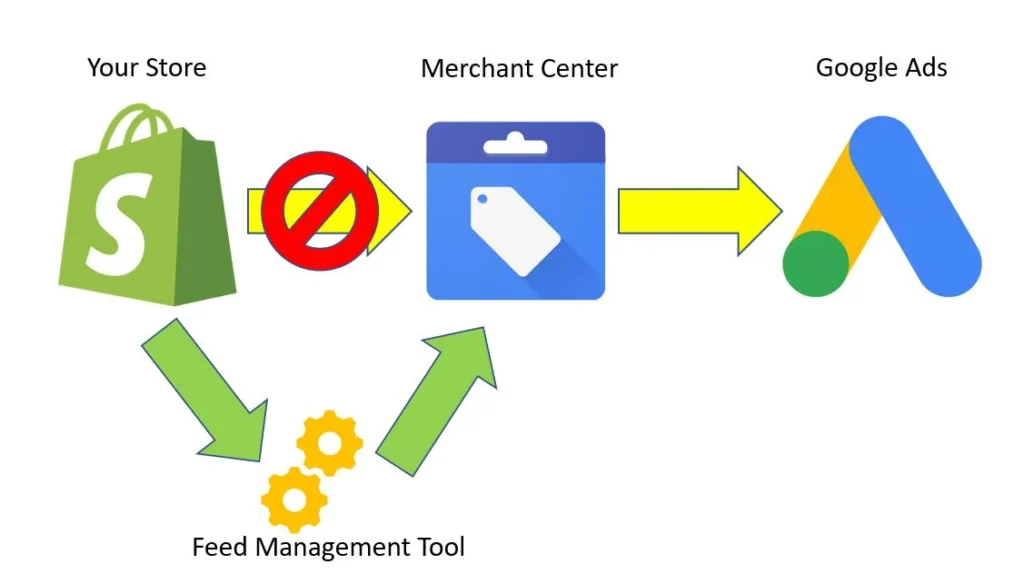
Google Merchant Center is a platform that allows businesses to upload, manage, and distribute product data so their products can appear across Google surfaces such as Shopping, Search, and ads. It acts as the bridge between your store and Google’s product ecosystem.
In 2026, it is not optional. It is the foundation of eCommerce visibility on Google.
If your products are not listed in Merchant Center, they do not exist in Google Shopping. If they are listed but not showing, there is usually a data, policy, or optimization issue holding them back.
If your products aren’t showing on Google Shopping, something is broken.
Most businesses assume running ads is enough. It is not. Google evaluates your product data, pricing accuracy, trust signals, and feed structure before deciding whether to show your products. Even approved products can fail to get impressions.
Many businesses eventually require structured Merchant Center management to scale consistently.
After working on hundreds of accounts, the pattern is consistent. Visibility problems are rarely random. They are almost always tied to feed quality or policy compliance.
This guide explains how to set up, optimize, and fix Google Merchant Center based on real issues that affect performance.
What is Google Merchant Center?
Simple Definition
Google Merchant Center is a tool that lets businesses upload product information such as titles, prices, images, and availability so Google can display those products in Shopping results, ads, and other placements across its platforms.
How Google Merchant Center Works
The system is straightforward, but the execution is where most businesses fail.
Here is the actual flow:
- You upload a product feed
- Google processes and validates the data
- Products are approved or disapproved
- Approved products become eligible for:
- Free listings
- Paid Shopping ads
- Performance Max campaigns
Google does not simply accept your data. It cross-checks it against your website. If there is any mismatch, trust drops.
For example:
- Price in feed ≠ price on website → disapproval
- Product marked in stock but unavailable → trust issue
- Missing GTIN → limited visibility
This is why many stores see “approved” products but still get zero impressions.
Approval does not guarantee visibility.
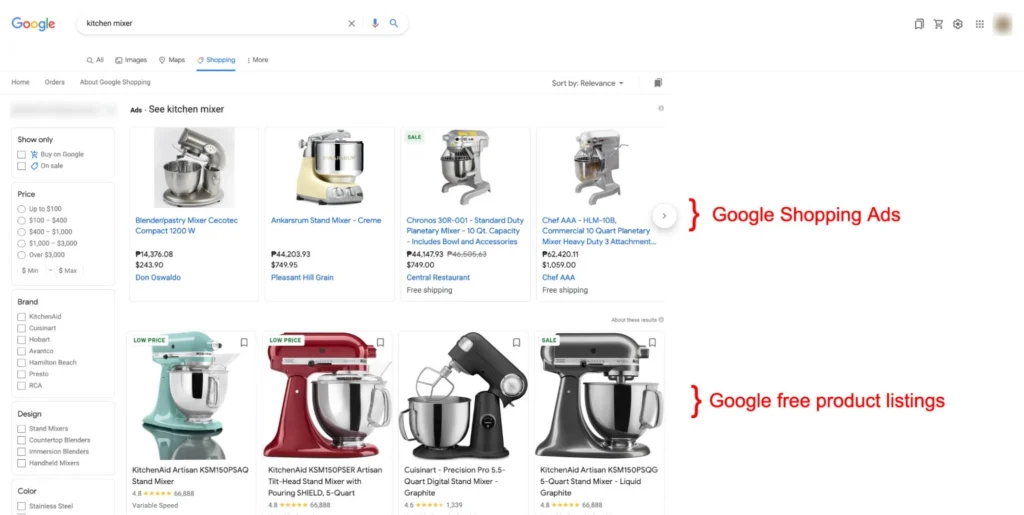
Where Your Products Appear
Once your feed is properly set up and trusted, your products can appear across multiple Google surfaces:
- Google Shopping tab
- Google Search results (product carousels)
- YouTube shopping integrations
- Google Discover feeds
This multi-surface exposure is what makes Merchant Center powerful. But it only works when your data is structured correctly.
Benefits of Google Merchant Center for Businesses
Free vs Paid Visibility
Google Merchant Center offers two types of exposure:
Free Listings
- Appear organically in Shopping tab
- No ad spend required
- Driven by feed quality and relevance
Paid Listings (Shopping Ads / Performance Max)
- Appear at top positions
- Controlled via bidding and budget
- Scaled through campaigns
Most businesses rely only on paid ads. That is a mistake.
A well-optimized feed can generate consistent free traffic alongside paid campaigns.
Increased Product Visibility and CTR
Merchant Center listings are visual. They include:
- Product image
- Price
- Store name
- Reviews
This increases click-through rate compared to text ads.
But visibility depends on:
- Title relevance
- Image quality
- Competitive pricing
Poor feeds result in low CTR even with high impressions.
High Purchase Intent Traffic
Users searching in Google Shopping are already in buying mode.
They are not browsing. They are comparing.
That means:
- Higher conversion rates
- Lower funnel traffic
- Better return on ad spend
However, if your pricing or data is not competitive, you will not win those clicks.
Integration with Google Ads and Performance Max
Merchant Center is tightly integrated with Google Ads.
It powers:
- Shopping campaigns
- Performance Max campaigns
Without Merchant Center, you cannot run product-based ads.
Key advantages:
- Automated product targeting
- Real-time inventory sync
- Scalable campaign structure
But automation only works if your feed is clean.
Google Merchant Center Account Setup (Step-by-Step)
Requirements Before Setup
Before creating an account, you need:
- A functional eCommerce website
- Clear product pages with pricing and availability
- Secure checkout (HTTPS)
- Refund and shipping policies visible
- Contact information (email, phone, address)
Missing any of these can trigger account suspension later.
Many businesses ignore this stage and rush into setup. That leads to trust issues.
Creating GMC Account
- Go to Google Merchant Center
- Sign in with your Google account
- Enter business details:
- Store name
- Country
- Time zone
Keep this information consistent with your website.
Verifying and Claiming Website
This step is critical.
Google needs proof that you own the website.
Methods include:
- HTML file upload
- Meta tag
- Google Analytics
- Google Tag Manager
After verification, you must claim the website inside Merchant Center.
If not done correctly, your products will never become active.
Linking with Google Ads
To run paid campaigns:
- Go to “Linked Accounts” in Merchant Center
- Connect your Google Ads account
- Approve the link from Google Ads
Without this connection:
- You cannot run Shopping ads
- Performance Max will not work
This step is simple but often missed in early setups.
Product Feed Setup and Optimization
What is a Product Feed
A product feed is a structured file that contains all your product data.
It includes:
- Title
- Description
- Price
- Availability
- Image link
- Brand
- GTIN
Google uses this data to decide:
- Whether to approve your products
- Where to show them
- How often to show them
Your feed is your ranking system in Google Shopping.
Required Attributes
At minimum, you need:
- ID
- Title
- Description
- Link
- Image link
- Price
- Availability
- Brand
- GTIN (for most products)
Missing or incorrect attributes reduce visibility.
GTIN is especially important. Without it, Google struggles to match your product with search demand.
Feed Types
There are multiple ways to submit your feed:
- Google Sheets
- Scheduled fetch (from your website)
- Content API (advanced setups)
For small stores, Sheets or fetch works fine.
For large catalogs, API is more reliable.
Product Title Optimization Strategy
Titles are the most important ranking factor.
A weak title:
- Reduces impressions
- Attracts irrelevant clicks
A strong title:
- Matches search queries
- Improves visibility
Best practice structure:
Brand + Product Type + Key Attributes + Variant
Example:
Nike Running Shoes Men Air Zoom Black Size 9
Avoid:
- Keyword stuffing
- Generic titles
- Missing attributes
Titles should reflect how users search, not how you name products internally.
Image Optimization Best Practices
Images directly impact CTR.
Use:
- High-resolution images
- Clean white background
- No watermarks or text overlays
Avoid:
- Blurry images
- Cropped products
- Lifestyle images as primary image
Google prefers clarity over creativity.
Common Feed Errors and Fixes
Typical issues include:
Price mismatch
- Cause: website and feed not synced
- Fix: update feed or website pricing immediately
Missing GTIN
- Cause: not provided
- Fix: add valid GTIN or mark as custom product
Image crawl errors
- Cause: broken URLs
- Fix: ensure images are accessible
Availability mismatch
- Cause: stock not updated
- Fix: sync inventory in real time
These errors do not just block products. They reduce overall account trust.
How to Rank Products on Google Shopping
Ranking in Google Shopping is not controlled by bids alone. Google decides which products to show based on data quality, relevance, and competitiveness. If your feed is weak, increasing budget will not fix visibility.
How Google Ranks Products
Google evaluates multiple signals before showing your product:
- Product title relevance to search query
- Feed completeness (attributes like GTIN, brand, category)
- Pricing competitiveness compared to similar sellers
- Historical performance (CTR and conversions)
- Account trust level (policy compliance, consistency)
In practice, this means:
- Two identical products can perform very differently based on title quality
- A cheaper product with poor data can lose to a higher-priced but well-optimized listing
- Accounts with past violations often struggle to scale even after fixes
Google does not say this directly, but performance history matters. If your products consistently get low engagement, visibility drops.
Keyword Strategy for Shopping Listings
Unlike search ads, you do not target keywords manually. Your product titles and attributes act as your keyword targeting.
That means:
- Titles must include real search terms
- Descriptions support relevance but have less weight
- Product type and Google category help refine matching
Actionable approach:
- Identify how users actually search (not internal naming)
- Include key attributes like color, size, use-case
- Place important keywords at the beginning of the title
Example:
Weak title:
Running Shoes Model X
Strong title:
Men Running Shoes Lightweight Breathable Black Size 9
The difference is not cosmetic. It directly impacts impressions.
Pricing and Competitor Benchmarking
Price is a ranking lever.
If your price is significantly higher than competitors:
- Your impressions drop
- Your CTR drops even if shown
Google compares:
- Product price
- Shipping cost
- Total value
Practical insights:
- Monitor competitor pricing regularly
- Use promotions to stay competitive
- Avoid hidden shipping costs
Many stores fail here. They optimize feeds but ignore pricing strategy.
Reviews and Ratings Impact
Ratings influence both visibility and clicks.
Products with strong reviews:
- Get higher CTR
- Build trust instantly
Google may prioritize listings that historically perform better, and reviews play a role in that performance.
To improve:
- Collect genuine product reviews
- Enable product ratings in Merchant Center
- Avoid fake or incentivized reviews
No reviews does not block visibility, but it limits performance.
Google Merchant Center Errors, Disapprovals and Suspensions
This is where most businesses struggle. Errors are not just technical issues. They directly impact visibility and account trust.
Common Product Disapprovals
Typical disapprovals include:
- Price mismatch
- Availability mismatch
- Invalid or missing GTIN
- Policy-restricted products
- Image violations
Real scenario:
A store updates prices on the website but not in the feed. Google crawls the page, detects inconsistency, and disapproves products.
This is one of the most common issues.
Account Suspension Types
There are different levels of suspension:
Account-level suspension
- Entire account disabled
- No products shown
Item-level issues escalating to suspension
- Repeated violations
- Ignored warnings
Misrepresentation suspension
- Most serious
- Often requires full audit to recover
Suspensions are not random. They are triggered by patterns.
How to Fix Disapproved Products
Fixing disapprovals requires identifying the root cause.
Process:
- Go to Diagnostics in Merchant Center
- Identify affected products
- Match issue with website data
- Fix inconsistency at source
- Resubmit feed
Do not just resubmit without fixing. It will fail again.
How to Recover Suspended GMC Account
Recovery depends on the reason.
For most suspensions:
- Audit website completely
- Fix policy violations
- Ensure data accuracy across all products
- Update business information (contact, policies)
- Submit review request
Important:
- Do not submit review without fixing issues
- Repeated failed reviews reduce trust further
Real-world pattern:
Stores that rush reconsideration without proper fixes often stay suspended longer.
Google Merchant Center Policies You Must Follow
Policies are not guidelines. They are enforcement rules. Violations affect both product visibility and account trust.
Misrepresentation Policy
This is the most common reason for suspension.
It includes:
- False pricing
- Misleading product information
- Hidden charges
- Inconsistent data between feed and website
Google expects transparency.
Even small mismatches can trigger issues.
Product Data Accuracy
Your product data must match your website exactly.
Key areas:
- Price
- Availability
- Title
- Description
If your feed says “In Stock” but product is unavailable, that is a violation.
Accuracy is not optional. It is foundational.
Website Trust Signals
Google evaluates your website like a user would.
Required trust elements:
- Clear return policy
- Shipping details
- Contact information
- Secure checkout
Missing these can lead to suspension even if your feed is perfect.
This is where E-E-A-T connects directly with Merchant Center.
If your site does not look trustworthy, your account will not perform.
Google Merchant Center and Google Ads (Scaling Strategy)
Merchant Center is the engine. Google Ads is the accelerator.
Linking GMC with Google Ads
Once linked:
- Products become available in campaigns
- You can run Shopping and Performance Max
Without proper linking, scaling is not possible.
Performance Max Explained
Performance Max is Google’s automated campaign type for eCommerce.
It uses:
- Product feed
- Audience signals
- Machine learning
To show ads across:
- Search
- Display
- YouTube
- Gmail
But here is the reality:
Performance Max depends heavily on feed quality. It also depends on how your bidding strategy is structured. If you are unsure whether to rely on automation or manual control, understanding the difference between Smart Bidding and manual bidding becomes important. You can read a detailed comparison here: https://aipulseinsights.com/smart-bidding-vs-manual-bidding-ppc/
If your feed is weak:
- Targeting becomes inaccurate
- Budget gets wasted
Shopping Ads vs Performance Max
Shopping Ads
- More control
- Manual structure
- Better for testing
Performance Max
- Automated
- Scalable
- Less control
Best approach:
- Use Shopping campaigns for testing
- Scale winners using Performance Max
Scaling Winning Products
Do not scale everything.
Focus on:
- High CTR products
- Strong conversion rate
- Competitive pricing
Actions:
- Increase budget gradually
- Improve titles and images further
- Segment products using custom labels
Scaling without data leads to wasted spend.
Advanced Optimization Strategies
Once your basics are correct, real growth comes from feed control and structured testing. Most stores never reach this stage because they stay stuck fixing errors. If your account is stable, this is where performance improves fast.
Feed Rules and Automation
Feed rules allow you to modify product data inside Merchant Center without changing your website or source feed.
Use cases:
- Add missing attributes
- Standardize titles
- Fix formatting issues
- Append keywords to titles
Example:
If your titles are missing brand names, you can create a rule to prepend the brand automatically.
Why this matters:
- Saves time
- Reduces manual errors
- Improves consistency across large catalogs
But do not overuse rules. Poor logic can break your feed at scale.
Custom Labels
Custom labels help you segment products for better campaign control.
You can assign labels like:
- Best sellers
- High margin
- Seasonal
- Low performance
These labels do not affect ranking directly, but they improve campaign decisions.
Practical use:
- Increase bids on high-margin products
- Reduce spend on low-performing items
- Push seasonal inventory faster
Without labels, scaling becomes inefficient.
A/B Testing Product Titles
Most businesses never test titles. They assume one version is enough.
It is not.
Small changes in titles can lead to:
- Higher impressions
- Better CTR
- Improved conversions
Testing approach:
- Identify low-performing products
- Rewrite titles with better keyword structure
- Monitor performance for 2–3 weeks
- Compare results
Focus on:
- Keyword placement
- Attribute clarity
- Removing unnecessary words
Do not change everything at once. Test in controlled batches.
Supplemental Feeds
Supplemental feeds allow you to enhance your main feed without replacing it.
Use cases:
- Add missing attributes
- Improve titles or descriptions
- Update seasonal data
This is especially useful for large stores where editing the main feed is difficult.
Example:
You can upload a supplemental feed that improves titles for top 100 products only.
This gives you flexibility without disrupting your entire catalog.
Common Mistakes That Kill GMC Performance
These are not minor issues. These are the reasons most accounts fail to scale.
- Poor product titles that do not match search intent
- Low-quality or unclear product images
- Policy violations that reduce account trust
- Incorrect pricing or inconsistent data
- Missing GTIN or structured attributes
- Ignoring free listings and relying only on ads
- Not fixing disapprovals properly
- Scaling campaigns without feed optimization
If your account is underperforming, one or more of these is usually the cause.
When to Hire a Google Merchant Center Expert
Not every business needs an expert at the start. But there are clear signals when you do.
Signs You Need Help
- Products are approved but getting no impressions
- Frequent disapprovals or recurring errors
- Account suspension with unclear reason
- Performance Max spending without results
- Feed is large and difficult to manage
These are not beginner-level problems. They require structured diagnosis.
What an Expert Actually Does
An experienced specialist does not just “manage feeds.”
They:
- Audit product data structure
- Fix policy risks before they trigger suspensions
- Optimize titles based on search behavior
- Improve feed quality for ranking
- Align pricing and performance strategy
- Structure campaigns for scale
Most importantly, they identify why something is not working.
That is where real value lies.
Our Google Merchant Center Services
If you are dealing with visibility issues, disapprovals, or scaling challenges, structured support can save time and revenue loss.
What We Offer
- Full GMC account setup
- Product feed optimization
- Error and disapproval fixes
- Suspension recovery support
- Performance Max strategy and scaling
- Ongoing feed and campaign management
The focus is always on performance, not just setup.
Why Choose Us
- Experience with real suspension cases
- Deep understanding of Google policies
- Practical feed optimization approach
- Focus on measurable results
This is not about theory. It is about fixing what blocks growth.
FAQs
What is Google Merchant Center used for?
Google Merchant Center is used to upload and manage product data so businesses can display their products on Google Shopping, Search, and ads. It enables both free listings and paid campaigns.
Is Google Merchant Center free?
Yes, creating and using a Merchant Center account is free. You can get traffic through free listings. Paid visibility requires running ads through Google Ads.
Why are my products not showing on Google?
Common reasons include poor product titles, missing attributes, pricing issues, low competitiveness, or account-level trust problems. Even approved products may not show if data quality is weak.
How long does product approval take?
Most products are reviewed within a few hours to 3 days. Delays can happen if Google needs additional checks or detects inconsistencies.
How do I fix a suspended Google Merchant Center account?
You need to identify the root cause, fix all policy violations, ensure data accuracy, and then submit a review request. Submitting without fixing issues usually leads to rejection.
Why is GTIN important in Google Merchant Center?
GTIN helps Google identify and match your product with global listings. It improves visibility, ranking accuracy, and overall performance in Shopping results.
What is Google Merchant Center used for?
Google Merchant Center is used to upload and manage product data so businesses can display their products on Google Shopping, Search, and ads. It enables both free listings and paid campaigns.
Is Google Merchant Center free?
Yes, creating and using a Merchant Center account is free. You can get traffic through free listings. Paid visibility requires running ads through Google Ads.
Why are my products not showing on Google?
Common reasons include poor product titles, missing attributes, pricing issues, low competitiveness, or account-level trust problems. Even approved products may not show if data quality is weak.
How long does product approval take?
Most products are reviewed within a few hours to 3 days. Delays can happen if Google needs additional checks or detects inconsistencies.
How do I fix a suspended Google Merchant Center account?
You need to identify the root cause, fix all policy violations, ensure data accuracy, and then submit a review request. Submitting without fixing issues usually leads to rejection.
Why is GTIN important in Google Merchant Center?
GTIN helps Google identify and match your product with global listings. It improves visibility, ranking accuracy, and overall performance in Shopping results.
Final Thoughts
Google Merchant Center is not just a setup task. It is a performance system.
If your data is accurate, structured, and optimized, it can drive consistent visibility and high-intent traffic.
If not, it blocks your products completely.
Most failures come down to:
- Feed quality issues
- Policy violations
- Lack of optimization
The opportunity is clear.
Fix the data. Align with Google’s requirements. Focus on real search behavior.
When done correctly, Merchant Center becomes one of the most reliable growth channels in eCommerce.
And when it is broken, it quietly kills your visibility.
That is why it needs to be handled with precision.

Mandeep Wraich
Digital Marketing Specialist and Content Strategist focused on data-driven growth, SEO, and performance-led content. At AIPulseInsights.com, articles explore how AI, analytics, and emerging digital trends influence marketing strategies, brand visibility, and business decision-making. With a strong foundation in content analysis, paid media, and strategic storytelling, the work shared on this platform converts complex industry shifts into practical insights that support marketers and businesses in achieving consistent, measurable growth. The goal is to simplify innovation and empower readers to stay ahead in a rapidly changing digital landscape.