A business starts with a single online store, creates a Google Merchant Center account, and launches Google Shopping campaigns. A year later, the company opens a second brand, expands into another country, hires a marketing agency, and adds a new ecommerce platform. Suddenly, nobody is sure which Merchant Center account owns which product feed, who has admin access, or whether another account should be created.
This situation is more common than many businesses realize. The account structure you choose in the beginning affects how easily you can scale, manage users, organize product data, maintain policy compliance, and avoid ownership conflicts in the future.
An effective Google Merchant Center account structure is not about creating more accounts. It is about creating the right architecture for your business model. Most businesses only need a single Merchant Center account, while agencies, marketplaces, and enterprise organizations often benefit from a more advanced structure using Multi-Client Accounts (MCAs) and sub-accounts.
In this guide, you’ll learn how Google organizes Merchant Center accounts, when to use different account types, common architectural mistakes, and practical recommendations for building a scalable Merchant Center environment that supports long-term ecommerce growth. If you’re new to the platform, start with our Complete Google Merchant Center Guide, which explains how Merchant Center works before diving into account architecture.
Understanding Google Merchant Center Account Structure
What Is a Merchant Center Account Structure?
Google Merchant Center account structure is the way Merchant Center accounts are organized, owned, and managed, including the relationship between standard accounts, Multi-Client Accounts (MCAs), sub-accounts, users, websites, and product feeds. A well-planned structure makes account management more scalable, secure, and compliant.
Think of your Merchant Center structure as the blueprint behind your Google Shopping operations. It determines:
- Which business owns the account
- Which website is associated with each account
- How product feeds are managed
- Who has administrative access
- Whether multiple businesses or brands are managed independently
- How agencies collaborate with clients
Unlike product optimization or campaign management, account architecture is difficult to change after an organization grows. Reorganizing multiple Merchant Center accounts often requires feed migration, website verification changes, user permission updates, and coordination across marketing and development teams.
Why Account Structure Matters
Many businesses focus on getting products approved as quickly as possible and pay little attention to account organization. That works initially, but poor architecture usually creates operational problems later.
A well-designed Merchant Center structure provides several advantages:
- Easier user management as teams grow
- Cleaner ownership between businesses and agencies
- Better organization for multiple brands or websites
- Simpler product feed maintenance
- Lower risk of accidental policy violations
- More efficient expansion into new markets
From practical implementation experience, the most common issue is not having too few Merchant Center accounts. It is having too many.
Businesses frequently create separate Merchant Center accounts for different departments, temporary agencies, or advertising experiments. Over time, these duplicate accounts lead to confusion about account ownership, website claims, feed management, and access permissions.
Google generally expects one Merchant Center account to represent one business. Following this principle keeps account management significantly cleaner over the long term.
How Google Organizes Merchant Center Accounts
Google Merchant Center uses a hierarchy designed to support businesses of different sizes.
At the highest level are two primary account types:
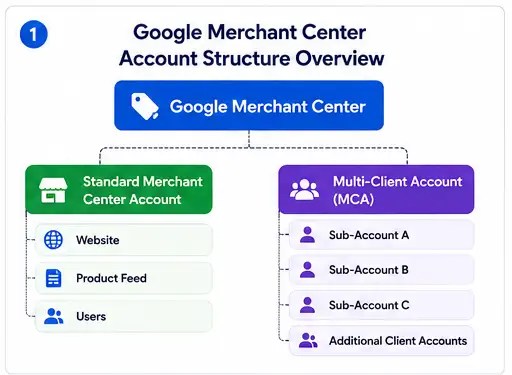
Each level serves a different purpose.
Standard Merchant Center Account
A standard account is designed for a single business operating one ecommerce operation. It owns its website verification, manages its own feeds, and controls its own user permissions.
This is the correct choice for the vast majority of online retailers.
Multi-Client Account (MCA)
An MCA acts as a management layer rather than a selling account.
Instead of containing products directly, it allows organizations to manage multiple Merchant Center accounts from one central location. Each sub-account remains an independent Merchant Center with its own products, website verification, and settings.
MCAs are commonly used by:
- Digital marketing agencies
- Enterprise retailers
- Marketplace operators
- Franchise organizations
- Companies managing multiple legal businesses
Sub-Accounts
Sub-accounts exist underneath an MCA.
Each sub-account behaves like an independent Merchant Center account while benefiting from centralized administration through the parent MCA.
This separation allows organizations to standardize management without combining unrelated businesses into a single Merchant Center account.
Types of Google Merchant Center Accounts
Choosing the correct account type depends on how your business operates today and how it is likely to grow over the next several years.
Standard Merchant Center Account
A standard Merchant Center account is the simplest and most common setup.
It is intended for businesses that manage their own ecommerce operations and sell products through a single organization.
This account type is typically the best fit for:
- Shopify stores
- WooCommerce businesses
- Direct-to-consumer brands
- Small and medium ecommerce companies
- Businesses with one primary website
Advantages
| Benefit | Explanation |
| Simple management | Everything is managed in one account. |
| Direct ownership | The business retains complete administrative control. |
| Easier policy management | One business identity reduces compliance complexity. |
| Straightforward integrations | Most ecommerce platforms connect directly with a standard account. |
Limitations
- Less suitable for managing unrelated businesses
- No centralized administration across multiple independent companies
- Limited for agencies managing dozens of clients
For most ecommerce merchants, these limitations are not actually disadvantages because they do not need enterprise-level account management.
Multi-Client Account (MCA)
A Multi-Client Account is designed for organizations that manage numerous Merchant Center accounts under centralized administration.
Unlike a standard account, an MCA does not replace individual Merchant Center accounts. Instead, it organizes and manages them.
Typical users include:
- Digital marketing agencies handling multiple ecommerce clients
- Large retailers operating several independent brands
- International organizations managing regional businesses
- Marketplace operators supporting many merchants
One important observation from real-world implementations is that agencies sometimes request an MCA before they actually need one. If an agency manages only a handful of long-term clients, individual account access is often simpler than introducing an additional management layer.
An MCA becomes valuable when centralized governance, onboarding efficiency, standardized permissions, and large-scale account administration outweigh the added complexity.
Merchant Center Sub-Accounts
Sub-accounts are individual Merchant Center accounts created and managed under a Multi-Client Account. Although they sit beneath an MCA, each sub-account remains an independent Merchant Center with its own website verification, product feeds, diagnostics, policies, and user settings.
This separation is one of the biggest strengths of the MCA model. It allows centralized oversight without merging multiple businesses into one Merchant Center.
For example, a digital marketing agency managing 75 ecommerce clients can access every client’s Merchant Center through a single MCA dashboard while each client retains its own account identity and ownership.
Standalone vs Managed Accounts
Many businesses struggle to decide whether they should operate a standalone Merchant Center account or place it under an MCA.
The answer depends on ownership and management requirements rather than company size alone.
| Feature | Standalone Merchant Center | Merchant Center Under MCA |
| Business ownership | Business manages directly | Business remains owner while managed through MCA |
| User management | Individual users | Centralized administration available |
| Website verification | Individual account | Individual sub-account |
| Product feeds | Managed independently | Managed independently |
| Best for | Single businesses | Agencies, enterprises, marketplaces |
| Scalability | Moderate | High |
| Central reporting | Limited | Easier across multiple accounts |
| Client separation | Not applicable | Fully separated |
A common misconception is that moving into an MCA means losing control of the Merchant Center account. That is not how Google’s architecture works.
Each sub-account continues to function independently. The MCA simply provides a centralized management layer.
When to Use a Standard Account
Most ecommerce businesses do not need enterprise account architecture.
If your company operates one primary online business with one legal entity and one ecommerce website, a standard Merchant Center account is usually the correct choice.
Keeping the structure simple reduces administrative overhead while making future maintenance easier.
Single Store Businesses
A business selling products through one Shopify or WooCommerce store should almost always begin with a standard Merchant Center account.
Example:
ABC Furniture
Website:
abcfurniture.com
↓
One Merchant Center Account
↓
One Product Feed
↓
Google Shopping
There is no operational advantage in creating multiple Merchant Center accounts for separate product categories, seasonal campaigns, or marketing teams.
Instead, organize products within one account using feed labels, custom labels, supplemental feeds, and product categories.
Small Ecommerce Brands
Growing ecommerce brands often believe they should create another Merchant Center account when they launch new product lines.
Usually, that is unnecessary.
Consider a skincare company selling:
- Face cleansers
- Moisturizers
- Sunscreens
- Hair care products
If all products belong to the same business and website, they should generally remain inside one Merchant Center account.
Creating multiple accounts introduces:
- duplicate administration
- multiple user lists
- additional website verification
- feed duplication
- unnecessary maintenance
Keeping everything centralized simplifies operations.
Businesses Managing One Website
Google expects Merchant Center accounts to represent businesses rather than marketing campaigns.
If your company operates:
- one domain
- one checkout process
- one legal business
- one product catalog
then one Merchant Center account is almost always sufficient.
Expanding the product catalog does not automatically require another account.
The same applies when introducing:
- new collections
- seasonal inventory
- promotional products
- additional Shopping campaigns
These changes belong inside the existing Merchant Center account.
Once you’ve chosen the right account type, the next step is to set up Google Merchant Center correctly, including website verification, product feeds, and shipping settings.
When to Use an MCA Structure
An MCA becomes valuable when an organization manages multiple independent Merchant Center accounts rather than multiple product categories.
The key distinction is independence.
Separate businesses require separate Merchant Center accounts.
Separate products usually do not.
Digital Marketing Agencies
Agencies are among the most common users of Multi-Client Accounts.
Instead of requesting individual access every time a new client signs up, the agency manages client Merchant Center accounts through one administrative dashboard.
Typical workflow:
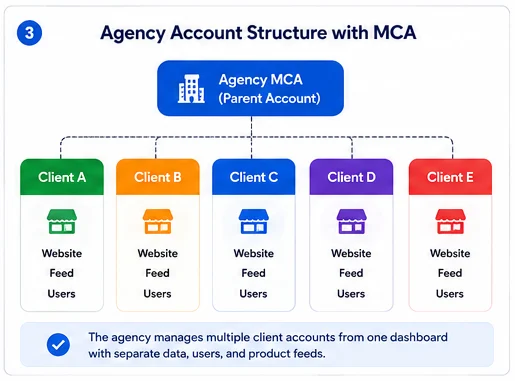
Benefits include:
- faster onboarding
- centralized user management
- easier troubleshooting
- simplified account navigation
- standardized operational processes
However, agencies should avoid creating Merchant Center accounts that they personally own unless specifically agreed with the client.
The business itself should ideally own its Merchant Center account while granting the agency appropriate access.
This prevents ownership disputes if the client changes marketing partners later.
One of the most difficult migrations occurs when an agency creates Merchant Center accounts using its own business information, then attempts to transfer ownership after several years.
Planning ownership correctly from the beginning avoids unnecessary disruption.
Multi-Brand Companies
Some organizations own multiple brands operating as separate businesses.
Example:
Parent Company
├── Brand Alpha
├── Brand Beta
├── Brand Gamma
Each brand may have:
- its own website
- independent inventory
- separate marketing teams
- unique customer support
- different pricing
In these situations, individual Merchant Center accounts managed through an MCA provide cleaner organization while preserving independence.
This also reduces the risk of accidentally mixing feeds, shipping settings, or tax configurations between brands.
Franchise Businesses
Franchise organizations often operate dozens or hundreds of locally managed businesses under one national brand.
For example:
National Franchise
↓
MCA
↓
Location A
Location B
Location C
Location D
Each location may require:
- unique inventory
- regional pricing
- localized promotions
- separate business information
An MCA allows headquarters to oversee every Merchant Center account while enabling local operators to manage their own catalogs where appropriate.
Marketplace Operators
Marketplaces represent one of the most advanced Merchant Center implementations.
Instead of selling their own products, marketplaces often support hundreds or thousands of independent merchants.
Each merchant typically requires:
- independent ownership
- separate policy compliance
- unique product catalog
- dedicated diagnostics
- isolated account performance
Using one Merchant Center account for every merchant would quickly become unmanageable.
An MCA provides centralized governance while keeping every seller’s Merchant Center isolated.
This architecture also simplifies account suspension management because policy issues affecting one merchant do not automatically impact every other seller managed under the MCA.
Understanding Google Merchant Center Sub-Accounts
Sub-accounts are where the actual business activity takes place.
While the MCA provides centralized administration, each sub-account manages its own:
- products
- feeds
- website claims
- shipping settings
- tax settings
- diagnostics
- user permissions
- policy compliance
Think of the MCA as the management office and the sub-accounts as independent stores.
How Sub-Accounts Work
Every sub-account receives its own Merchant Center identity.
Example:
Agency MCA
↓
Client One
products.clientone.com
↓
Feed A
Agency MCA
↓
Client Two
shop.clienttwo.com
↓
Feed B
The two businesses remain completely separate even though they are administered through the same MCA.
This isolation protects businesses from operational mistakes while making administration much more efficient for organizations managing many accounts.
Benefits of Sub-Accounts
A well-planned sub-account structure offers advantages that go beyond organization. It improves operational control, makes troubleshooting faster, and reduces the likelihood of accidental configuration errors.
Key benefits include:
- Independent website verification: Each business verifies and claims its own website without affecting others.
- Separate product diagnostics: Feed errors, policy warnings, and product disapprovals remain isolated to the affected business.
- Dedicated settings: Shipping, returns, taxes, and business information can be configured independently.
- Simplified client management: Agencies can onboard and offboard clients without disrupting other accounts.
- Better security: Access can be granted only to users who need it for a specific business.
- Scalable operations: Hundreds of accounts can be managed from one centralized dashboard.
For enterprise organizations, these benefits become increasingly important as product catalogs, marketing teams, and regional operations grow.
Common Use Cases
Sub-accounts are particularly useful in scenarios where businesses need operational separation while maintaining centralized oversight.
Example 1: Marketing Agency
Agency MCA
├── Fashion Client
├── Electronics Client
├── Furniture Client
└── Beauty Client
Each client maintains ownership of its Merchant Center account while the agency manages campaigns, feeds, and troubleshooting.
Example 2: International Retailer
Global Brand
↓
MCA
├── United States
├── Canada
├── United Kingdom
├── Australia
└── Germany
Each country operates its own Merchant Center account with localized:
- product availability
- shipping services
- currencies
- tax settings
- languages
Example 3: Enterprise Brand Portfolio
Holding Company
↓
MCA
├── Sports Brand
├── Outdoor Brand
├── Kids Brand
├── Luxury Brand
└── Home Brand
Marketing teams remain independent while corporate leadership maintains centralized governance.
Recommended Google Merchant Center Account Structures
There is no universal Merchant Center architecture that fits every business. The right structure depends on legal entities, websites, product catalogs, geographic expansion, and management responsibilities.
The following models represent proven implementations for different business types.
Single Brand Structure
This is the simplest and most efficient setup for most ecommerce businesses.
Business
↓
Website
↓
Standard Merchant Center
↓
Primary Product Feed
↓
Google Shopping
Best For
- Shopify stores
- WooCommerce stores
- Direct-to-consumer brands
- Small and medium ecommerce businesses
Advantages
- Simple administration
- One source of product data
- Easy website verification
- Lower maintenance
- Straightforward user management
Tradeoffs
Multiple Brand Structure
- Less suitable if multiple independent businesses are added later
- Limited centralized management if acquiring additional brands
Organizations operating several brands should generally avoid combining every brand into one Merchant Center account.
Instead:
Parent Company
↓
MCA
├── Brand A
├── Brand B
├── Brand C
Each brand maintains:
- separate product feeds
- independent diagnostics
- unique website verification
- dedicated business settings
Advantages
- Clear ownership
- Better operational separation
- Easier policy management
- Independent marketing teams
Tradeoffs
- More administrative planning
- Additional feed maintenance
- More users to manage
Agency Client Structure
Agencies benefit from centralized administration without taking ownership away from clients.
Agency MCA
├── Client 1
├── Client 2
├── Client 3
├── Client 4
└── Client 5
Recommended workflow:
- Client creates the Merchant Center account.
- Client verifies the website.
- Client grants MCA access.
- Agency manages feeds and Shopping campaigns.
This approach avoids one of the most common ownership disputes encountered during agency transitions.
International Business Structure
International ecommerce operations often require localized Merchant Center environments.
Global Company
↓
MCA
├── USA
├── UK
├── France
├── Germany
├── Australia
Each regional account can manage:
- local language
- regional inventory
- country-specific shipping
- tax configuration
- local promotions
This model is especially effective when different regional teams are responsible for operations.
For businesses selling globally from one website with a unified catalog, however, multiple Merchant Center accounts may not be necessary. Expansion alone does not automatically justify additional accounts.
Enterprise Ecommerce Structure
Large retailers frequently have the most complex Merchant Center architecture.
Enterprise MCA
├── Brand A
│ ├── US
│ ├── UK
│ └── Canada
│
├── Brand B
│ ├── US
│ └── Australia
│
└── Brand C
├── Germany
└── France
This structure supports:
- multiple legal entities
- international expansion
- independent marketing teams
- localized compliance
- separate inventory systems
- scalable governance
Although more sophisticated, it also requires documented ownership policies, standardized naming conventions, and consistent feed management processes.
How to Organize Products Across Accounts
One of the most misunderstood aspects of Merchant Center architecture is product organization.
Businesses often assume that adding products requires adding accounts. In reality, product organization should reflect business structure rather than catalog size.
Separate Product Feeds
Multiple product feeds do not require multiple Merchant Center accounts.
Within a single Merchant Center account, businesses can manage:
- primary feeds
- supplemental feeds
- scheduled fetches
- Content API feeds
- platform integrations
For example, a retailer may use:
- one primary feed from Shopify
- one supplemental feed for promotions
- another supplemental feed for custom labels
All of these remain inside the same Merchant Center account.
Multiple Domains
Multiple domains require careful planning.
Consider these examples.
Appropriate for One Merchant Center
- example.com
- us.example.com
- uk.example.com
These often represent one business serving different regions.
May Require Separate Accounts
- brandone.com
- brandtwo.com
If these represent separate brands or legal entities, independent Merchant Center accounts are generally the cleaner solution.
The decision should be based on business ownership, branding, and operational independence rather than simply the number of domains.
Country-Specific Catalogs
Businesses selling internationally may organize products by country when:
- inventory differs
- pricing differs
- shipping services differ
- local regulations differ
- product availability varies
Rather than duplicating every product across unrelated Merchant Center accounts, use regional account architecture only where operational differences justify it.
Brand Separation
If multiple brands share one backend inventory system but have separate customer-facing identities, separate Merchant Center accounts usually provide better long-term organization.
Benefits include:
- independent diagnostics
- separate product approval history
- cleaner reporting
- simplified feed management
- reduced operational confusion
The guiding principle is simple: organize Merchant Center accounts around businesses and brands, not around temporary marketing needs or product categories.
Managing Users and Permissions
Even the best Merchant Center account structure can become difficult to manage if user access is poorly controlled. As businesses grow, new employees join, agencies change, and responsibilities shift. Without a clear permission strategy, businesses often discover former employees still have admin access while current team members cannot make necessary changes.
A structured permission model improves security, simplifies collaboration, and reduces ownership disputes.
Admin Access
Administrators have complete control over a Merchant Center account.
An admin can:
- Add or remove users
- Link Google Ads accounts
- Configure shipping and tax settings
- Manage product feeds
- Verify and claim websites
- Change account settings
- Grant additional administrative access
Administrators are also responsible for linking Merchant Center with Google Ads so approved products can appear in Shopping campaigns and Performance Max campaigns. If you haven’t completed this step yet, follow our How to Link Google Merchant Center to Google Ads guide for detailed instructions.
Because of this level of control, admin access should be limited to a small number of trusted individuals.
A practical approach is:
| Role | Admin Access? |
| Business owner | Yes |
| Ecommerce manager | Yes |
| Operations manager | If required |
| Marketing specialist | Usually No |
| External freelancer | No |
| Temporary contractor | No |
Avoid assigning admin rights simply because someone needs to upload products or manage campaigns.
Standard Users
Most employees only need standard access.
Typical responsibilities include:
- Reviewing diagnostics
- Managing product feeds
- Updating promotions
- Monitoring approvals
- Coordinating Shopping campaigns
Granting the lowest level of access necessary follows the principle of least privilege and reduces the risk of accidental configuration changes.
For example:
| Team Member | Recommended Access |
| Feed specialist | Standard User |
| PPC manager | Standard User |
| SEO manager | Standard User |
| Customer support | View only, if needed |
| IT administrator | Admin |
Separating operational work from administrative control creates a safer Merchant Center environment.
Email Access Best Practices
Many Merchant Center ownership problems begin with poor email management rather than technical issues.
Common examples include:
- Merchant Center created using a personal Gmail account
- Former employee listed as the only administrator
- Agency email used as the primary owner
- Shared inbox credentials known by multiple people
These situations often become serious when businesses change agencies or employees leave.
Recommended practices include:
- Use a company-owned Google account whenever possible.
- Ensure at least two trusted internal administrators have access.
- Avoid personal email addresses for account ownership.
- Document the primary account owner.
- Remove unnecessary access promptly.
A simple ownership policy can prevent lengthy recovery processes if access is ever lost.
Agency Access Management
Agencies frequently need Merchant Center access to manage feeds and Shopping campaigns. However, access should be granted in a way that protects both the client and the agency.
A recommended workflow is:
- The business creates the Merchant Center account.
- The business verifies and claims the website.
- The business retains primary admin ownership.
- The agency receives appropriate user access or manages the account through an MCA.
- Access is reviewed periodically.
This approach ensures continuity if the business changes marketing partners.
One recurring issue during Merchant Center migrations is discovering that an agency created and owns the Merchant Center account. Transferring ownership later can involve website verification changes, permission updates, and coordination across multiple Google services.
Establishing ownership correctly from the beginning avoids these complications.
Common Google Merchant Center Structure Mistakes
Most Merchant Center account issues are not caused by product feeds. They result from poor account planning.
The following mistakes appear repeatedly across businesses of all sizes.
Creating Duplicate Accounts
A business launches Google Shopping, forgets about an old Merchant Center account, and creates another one.
Later:
- both accounts contain similar products
- website ownership becomes unclear
- different employees manage different accounts
- feed updates become inconsistent
Duplicate accounts create unnecessary complexity and can lead to policy concerns if the same business attempts to represent itself through multiple unrelated Merchant Center accounts without a valid operational reason.
Before creating a new Merchant Center account, verify whether one already exists for the business.
Mixing Multiple Businesses
Another common mistake is placing unrelated businesses inside one Merchant Center account.
Example:
Merchant Center
↓
Furniture Store
↓
Electronics Store
↓
Pet Supply Store
If these businesses have different:
- legal entities
- websites
- customer support
- branding
they should generally operate independent Merchant Center accounts.
Separating businesses improves reporting, feed organization, and policy management.
Incorrect Domain Assignments
Website claims are one of the most important components of Merchant Center ownership.
Problems occur when:
- multiple accounts attempt to claim the same website
- agencies verify client websites using agency-owned accounts
- businesses create unnecessary Merchant Center accounts for identical domains
Website verification should reflect the actual business owner, not the current service provider.
If your website hasn’t been claimed yet or you’re unsure about the verification process, follow our Google Merchant Center Business Verification Guide before making structural changes.
Maintaining consistent website ownership simplifies future account changes.
Poor User Permission Management
Businesses often accumulate users over time without reviewing access.
Typical examples include:
- former employees
- previous agencies
- temporary consultants
- inactive contractors
Old accounts increase security risks and create confusion during troubleshooting.
A quarterly permission review is a simple practice that keeps Merchant Center administration secure and organized.
Using the Wrong Account Type
Some businesses implement an MCA simply because they believe it is the “professional” option.
Others continue operating dozens of unrelated Merchant Center accounts without centralized management.
Both situations reduce efficiency.
Before selecting an account type, ask:
- How many independent businesses are being managed?
- Are there multiple legal entities?
- Is centralized administration required?
- Will the organization continue expanding?
Choosing the appropriate structure early reduces future migration work.
Google Merchant Center Account Structure Best Practices
Businesses rarely regret spending time planning their Merchant Center architecture. They often regret rushing into a structure that becomes difficult to manage later.
The following practices consistently produce cleaner, more scalable Merchant Center environments.
Keep One Business Per Account
As a general rule, one Merchant Center account should represent one business.
This keeps:
- ownership clear
- product feeds organized
- policies consistent
- reporting straightforward
Avoid creating additional accounts simply because the catalog grows.
Use MCA Only When Necessary
An MCA is a management tool, not a requirement.
Use it when you manage:
- multiple clients
- multiple independent brands
- marketplace sellers
- regional Merchant Center accounts
If you operate one ecommerce business, a standard Merchant Center account is usually sufficient.
Maintain Consistent Business Information
Ensure every Merchant Center account contains consistent:
- business name
- website
- contact information
- shipping policies
- return policies
- tax settings
Consistency reduces operational confusion and supports smoother account management.
Standardize Feed Management
Document how feeds are:
- generated
- updated
- monitored
- validated
Standardized processes make troubleshooting easier and reduce the likelihood of inconsistent product data across accounts.
Review User Access Regularly
Schedule regular permission audits to:
- remove inactive users
- update employee roles
- verify administrator access
- confirm agency permissions
Regular reviews strengthen security and simplify account administration.
Document Account Ownership
Maintain internal documentation that records:
- primary account owner
- admin users
- linked Google Ads accounts
- website verification details
- feed sources
- agency relationships
This documentation becomes invaluable during audits, migrations, employee turnover, or account recovery.
Choosing the Right Account Structure
Selecting the correct Google Merchant Center account structure starts with understanding how your business operates today and how it is likely to grow over the next few years. A structure that works for a single online store may become inefficient for an enterprise managing multiple brands, countries, or clients.
Rather than asking, “How many Merchant Center accounts should I create?”, ask whether separate accounts are truly needed from an operational perspective.
Questions to Ask Before Creating Accounts
Before setting up a new Merchant Center account, consider the following questions.
How Many Brands Do You Manage?
If all products belong to one brand operating under one business, a standard Merchant Center account is usually sufficient.
If each brand has its own identity, website, marketing team, and customer experience, separate Merchant Center accounts managed through an MCA may be the better option.
Do You Operate Multiple Websites?
Multiple websites do not always require multiple Merchant Center accounts.
For example:
- store.example.com
- uk.example.com
- ca.example.com
may all belong to one business.
However:
- brandalpha.com
- brandbeta.com
often represent separate businesses or brands and are usually easier to manage independently.
Do You Sell in Multiple Countries?
International expansion alone does not require multiple Merchant Center accounts.
Consider separate accounts when countries have:
- independent inventory
- different business entities
- localized operations
- regional teams
- country-specific product catalogs
Otherwise, one Merchant Center account may continue to support international growth effectively.
Will an Agency Manage the Account?
If an agency is only managing one Merchant Center account, direct user access is usually enough.
If the agency manages dozens or hundreds of Merchant Center accounts, an MCA provides more efficient administration while allowing clients to retain ownership.
Are There Separate Legal Entities?
Different legal businesses should generally maintain separate Merchant Center accounts.
Examples include:
- Holding companies
- Franchise operators
- Marketplace sellers
- Corporate subsidiaries
Keeping legal entities separate simplifies compliance, reporting, and account governance.
Decision Matrix
The following matrix can help determine which account structure best fits your business.
| Business Type | Recommended Structure | MCA Needed? |
| Single Shopify store | Standard Merchant Center | No |
| WooCommerce business | Standard Merchant Center | No |
| One website, one business | Standard Merchant Center | No |
| Multi-brand retailer | MCA with separate sub-accounts | Usually |
| Marketing agency | MCA | Yes |
| Franchise organization | MCA | Usually |
| Marketplace platform | MCA | Yes |
| Enterprise retailer | MCA with regional structure | Yes |
| International business with separate legal entities | MCA | Usually |
There is no advantage in adding complexity simply because it is available. The most effective Merchant Center architecture is the one that matches your actual business operations.
When to Seek Professional Help
Some Merchant Center implementations are straightforward. Others involve multiple websites, international catalogs, legacy accounts, and ownership challenges that require careful planning.
Professional guidance is often worthwhile when dealing with:
- International expansion
- Enterprise product catalogs
- Multi-brand organizations
- Agency onboarding
- Merchant Center migrations
- Account ownership disputes
- Duplicate Merchant Center accounts
- Website verification conflicts
- Suspension recovery
- Large-scale feed restructuring
These situations typically affect more than Merchant Center alone. They may involve product feeds, Google Ads, website verification, tax settings, shipping configurations, and business governance.
If your Merchant Center environment has become difficult to manage or you’re designing an architecture for future growth, our Google Merchant Center Services team can help you build a scalable account structure, optimize product feeds, resolve account issues, and support long-term Shopping performance.
Frequently Asked Questions
What is a Google Merchant Center account structure?
A Google Merchant Center account structure is the organizational framework that defines how Merchant Center accounts, users, websites, product feeds, and ownership are arranged for efficient management.
What is a Multi-Client Account (MCA)?
A Multi-Client Account is a parent Merchant Center account that allows organizations to manage multiple independent Merchant Center accounts from a centralized dashboard.
When should I use an MCA?
Use an MCA if you manage multiple independent businesses, client accounts, brands, or regional Merchant Center accounts that require centralized administration.
Can one business have multiple Merchant Center accounts?
Yes, but only when there is a valid operational reason. Most businesses are better served by maintaining a single Merchant Center account.
Can multiple websites use one Merchant Center account?
Yes. If the websites belong to the same business and support the same operations, they can often be managed within one Merchant Center account.
How many sub-accounts can an MCA have?
Google supports large numbers of sub-accounts, making MCAs suitable for agencies, marketplaces, and enterprise organizations.
Can agencies manage multiple Merchant Center accounts?
Yes. An MCA is specifically designed to help agencies manage multiple client Merchant Center accounts efficiently.
Should each brand have its own Merchant Center account?
If brands operate independently with separate websites or legal entities, maintaining separate Merchant Center accounts is generally recommended.
How do Merchant Center user permissions work?
Administrators have full control, while standard users receive limited access based on their
Can I use one Merchant Center account for multiple countries?
Yes. Many businesses successfully manage multiple countries within a single Merchant Center account, depending on their operational model.
Does every website need its own Merchant Center account?
No. The decision should be based on business ownership and operational requirements rather than simply the number of websites.
Conclusion
Google Merchant Center account structure is far more than an administrative setup choice. It defines how your business manages products, controls user access, maintains ownership, and scales its ecommerce operations over time.
A thoughtfully designed structure makes product feed management more efficient, reduces policy and ownership issues, and provides a solid foundation for future growth. Whether you’re running a single Shopify store or managing a global portfolio of brands, aligning your Merchant Center architecture with your business model will save time and reduce complexity as your organization evolves.
For most businesses, a single Merchant Center account is the right starting point. As operations expand across brands, countries, or clients, introducing an MCA and well-organized sub-accounts can provide the centralized control needed without sacrificing independence.
Before creating additional Merchant Center accounts, take the time to evaluate your business structure, long-term goals, and management requirements. Making the right architectural decisions early is much easier than reorganizing a complex Merchant Center environment later.
If you’re planning international expansion, restructuring existing accounts, recovering from ownership issues, or designing a scalable Merchant Center environment from the ground up, professional Merchant Center architecture planning can help you avoid costly mistakes and build an infrastructure that supports long-term ecommerce success.

Mandeep Wraich
Digital Marketing Specialist and Content Strategist focused on data-driven growth, SEO, and performance-led content. At AIPulseInsights.com, articles explore how AI, analytics, and emerging digital trends influence marketing strategies, brand visibility, and business decision-making. With a strong foundation in content analysis, paid media, and strategic storytelling, the work shared on this platform converts complex industry shifts into practical insights that support marketers and businesses in achieving consistent, measurable growth. The goal is to simplify innovation and empower readers to stay ahead in a rapidly changing digital landscape.