You’ve built your store.
You’ve added products.
Maybe you even started ads.
But your products are nowhere to be found on Google Shopping.
No impressions. No clicks. No sales.
Your products are live, but invisible.
This is where most beginners get stuck. Not because their products are bad. Not because demand is low. But because they are missing one key piece: understanding Google Merchant Center.
If you’re already facing issues with setup, product disapprovals, or account errors, you can explore our Google Merchant Center service to fix everything correctly from the start.
Many new store owners think running ads is enough. It’s not. Google cannot show your products unless it understands them properly. And that understanding comes from Google Merchant Center.
In this guide, I’ll break everything down in simple steps. No confusing terms. No assumptions. Just clear explanations so you can finally get your products visible on Google.
What is Google Merchant Center?
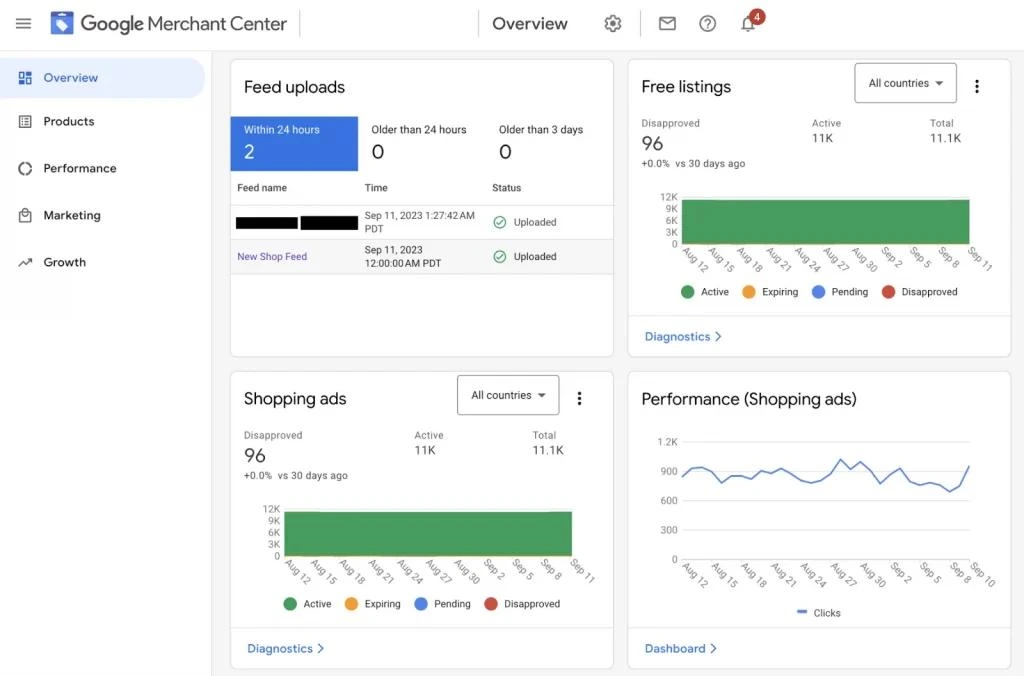
Simple Definition
Google Merchant Center is a platform where you upload your product information so Google can display your products across its platforms, including Google Shopping, Search, and Ads. It acts as the source of truth for your product data.
Real-World Analogy
Think of Google Merchant Center like a warehouse catalog system.
Your store is the shop.
But Google is like a marketplace.
Before Google can display your products, it needs a clean, organized catalog of everything you sell. That catalog lives inside Merchant Center.
If your catalog is messy, incomplete, or incorrect, Google simply won’t show your products.
Why Google Needs This Platform
Google is not your website.
It cannot guess your product details. It needs structured data like:
- Product title
- Price
- Availability
- Image
- Brand
Without this data, Google has no reliable way to show your products to users.
This is why Merchant Center exists. It collects, organizes, and validates your product information before showing it to potential buyers.
How Google Merchant Center Works (Step-by-Step)
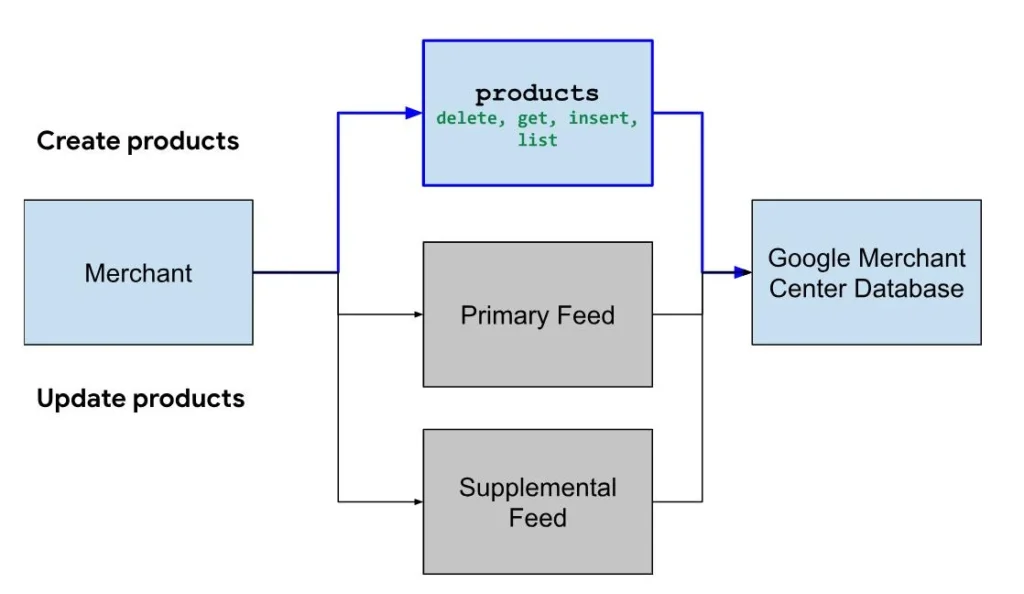
Let’s simplify the process so you can clearly understand how everything connects.
Here’s the basic flow:
Store → Feed → GMC → Google → Customers
Now let’s break it down.
Step 1: Upload Your Product Data
First, you need to provide your product information.
This can come from:
- Your website (Shopify, WooCommerce, etc.)
- A spreadsheet
- A feed automation tool
Step 2: Create a Product Feed
A product feed is simply a file that contains all your product details in a structured format.
This includes:
- Titles
- Prices
- Images
- Descriptions
- Availability
We’ll explain this in detail later because this is where most beginners make mistakes.
Step 3: Submit Feed to Merchant Center
Once your feed is ready, you upload it to Google Merchant Center.
This is where Google starts analyzing your data.
Step 4: Google Reviews Your Products
Google checks your products for:
- Accuracy
- Policy compliance
- Website consistency
If something doesn’t match or violates rules, your products get disapproved.
Step 5: Products Appear on Google
If everything is correct, your products can start appearing in:
- Google Shopping
- Search results
- Free listings
Step 6: Connect with Google Ads
To drive traffic faster, you connect Merchant Center with Google Ads.
This allows you to run Shopping campaigns using your product data.
If you want a complete step-by-step walkthrough, check our detailed Google Merchant Center guide covering setup, optimization, and fixing common issues.
Why Google Merchant Center is Important
Without Merchant Center, your products cannot appear on Google Shopping. It’s that simple.
Here’s why it matters:
Visibility on Google Shopping
Your products become visible where buyers are actively searching.
Free Product Listings
You don’t always need ads. Google also shows products for free.
High Purchase Intent Traffic
People searching for products are ready to buy. This is not casual browsing traffic.
Better Product Discovery
Google helps match your products with relevant searches based on your data.
Google Merchant Center vs Google Ads
Many beginners confuse these two. Let’s clear it up.
| Feature | Google Merchant Center | Google Ads |
|---|---|---|
| Purpose | Stores product data | Drives traffic |
| Role | Data engine | Traffic engine |
| Function | Sends product info to Google | Promotes products via ads |
Simple way to remember:
- Merchant Center = what you sell
- Google Ads = how you promote it
You need both working together for the best results.
This foundation is critical. If Merchant Center is not set up correctly, ads won’t perform well either.
What is a Product Feed?
This is the part where most beginners struggle. If your products are not showing, your product feed is usually the reason.
Simple Definition
A product feed is a structured file that contains all your product information in a format Google can understand and process.
What It Includes
Your product feed is not just a list of items. It must include specific attributes that Google requires.
Key elements include:
- Title
- Price
- Image
- Availability
- Brand
- GTIN (Global Trade Item Number)
Each of these helps Google understand what you are selling and when to show it.
Real-World Analogy
Think of a product feed like an Excel sheet.
Each row = one product
Each column = product detail
If your sheet is clean and complete, Google can easily read it.
If it has missing or incorrect data, Google gets confused and may reject your products.
Why Product Feed Matters
This is where many beginners go wrong.
Your product feed controls:
- Whether your products get approved
- Whether they show on Google
- How well they perform
If your feed is weak, nothing else works properly.
Example: Bad vs Optimized Product Title
Bad Title:
Shoes
Optimized Title:
Men’s Running Shoes Nike Air Zoom Black Size 9
Why this matters:
- The second title gives clear details
- It matches search intent better
- It improves visibility and clicks
Small changes like this can make a big difference.
Common Beginner Mistakes
If your products are not showing, chances are you are making one of these mistakes.
Incorrect Product Data
- Prices don’t match your website
- Availability is wrong
- Missing required fields
Google checks your website against your feed. If things don’t match, products get disapproved.
Policy Violations
Many beginners don’t read Google’s policies.
Common issues include:
- Misleading product information
- Restricted products
- Missing business details
This can even lead to account suspension.
Poor Feed Optimization
- Generic product titles
- Missing keywords
- Low-quality descriptions
This reduces visibility even if your products are approved.
Website Issues
Google also checks your website.
Problems include:
- Broken pages
- Missing contact information
- No return policy
If your site looks untrustworthy, Google won’t show your products.
Account Suspension
This is more serious.
It usually happens due to:
- Repeated policy violations
- Misrepresentation
- Inconsistent data
Recovering from suspension takes time and proper fixes.
Beginner Pro Tips to Get Better Results
If you want better visibility and approvals, focus on these basics.
Optimize Product Titles
- Include brand, type, and key features
- Match what users actually search
Follow Policies Strictly
- Always check Google’s requirements
- Avoid shortcuts or misleading data
Keep Data Accurate
- Match your website exactly
- Update prices and stock regularly
Use High-Quality Images
- Clear background
- No watermarks
- Proper resolution
Update Feed Regularly
- Keep your data fresh
- Avoid outdated information
These are simple steps, but they solve most beginner problems.
When Beginners Should Seek Help
Sometimes, even after trying everything, things don’t work. That’s when expert help becomes useful.
Signs You’re Stuck
- Products are not showing at all
- You keep getting feed errors
- Your account gets suspended
If you’re facing these issues repeatedly, it’s not just a small mistake. It usually requires a deeper fix.
What Expert Help Solves
- Faster product approvals
- Proper feed optimization
- Suspension recovery
An experienced specialist can quickly identify what’s wrong and fix it correctly.
If you’re spending time guessing and not seeing results, getting help can save both time and money.
Want to Go Deeper?
Now that you understand the basics, the next step is learning how to set everything up correctly and avoid common mistakes.
If you want practical, step-by-step help, explore these resources:
- A complete setup guide to connect your store and launch your first products
- Advanced feed optimization strategies to improve visibility
- Troubleshooting guides for disapprovals and suspensions
If you offer services, this is also the right place to guide users toward your Google Merchant Center setup or management page in a natural way.
For example, you can introduce it like this:
If you want expert help setting up or fixing your Merchant Center account, you can explore a dedicated service that handles feed setup, optimization, and issue resolution.
Keep this section helpful, not sales-heavy. The goal is to guide, not push.
FAQs
Is Google Merchant Center free?
Yes, Google Merchant Center is free to use. You can list your products on Google without paying. However, if you want faster traffic and better reach, you can connect it with Google Ads and run paid campaigns.
Do I need a website to use Google Merchant Center?
Yes, in most cases you need a website. Your products must be hosted on a site where users can view details and make purchases. Google checks your website for accuracy and trust.
How long does product approval take?
Product approval usually takes a few hours to a few days. If there are issues with your data or website, it can take longer or result in disapproval.
Can beginners use Google Merchant Center?
Yes, beginners can use it. But many struggle at first due to feed setup, policies, and technical details. With the right guidance, it becomes much easier.
What happens if my account gets suspended?
If your account is suspended, your products will stop showing on Google. You need to fix the issues causing the suspension and request a review. This process can take time and requires careful correction.
Final Thoughts
Google Merchant Center is not optional if you want your products to appear on Google.
It is the foundation of your product visibility.
Most beginners don’t fail because their products are bad. They fail because:
- Their product data is incorrect
- Their feed is poorly optimized
- Their setup does not follow Google’s rules
Once you fix these basics, everything changes.
Your products start appearing.
Your visibility improves.
Your chances of getting sales increase.
Here’s the truth most people miss:
If your products are not showing, the issue is not demand.
It is setup and data quality.
Focus on getting the foundation right, and the results will follow.

Mandeep Wraich
Digital Marketing Specialist and Content Strategist focused on data-driven growth, SEO, and performance-led content. At AIPulseInsights.com, articles explore how AI, analytics, and emerging digital trends influence marketing strategies, brand visibility, and business decision-making. With a strong foundation in content analysis, paid media, and strategic storytelling, the work shared on this platform converts complex industry shifts into practical insights that support marketers and businesses in achieving consistent, measurable growth. The goal is to simplify innovation and empower readers to stay ahead in a rapidly changing digital landscape.